





May 2024 Release Notes
Release Date: May 1, 2024
What’s New in Clari?
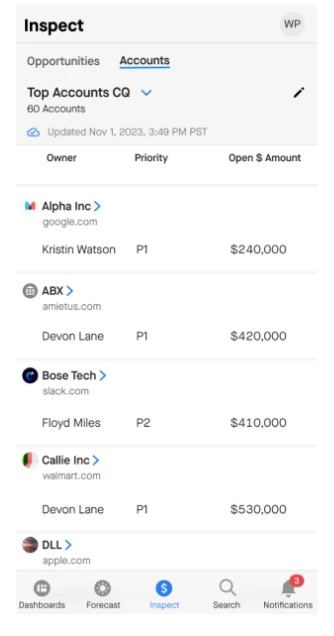
Inspect Accounts on Mobile: Views and Search
Clari now supports Accounts on mobile. You can inspect all of your Accounts including activity insights and CRM details from anywhere. Drill into an Account to find open, closed, and even closed-won deals to brush up on historical context. Within an Account view, a simple click allows you to sort on any CRM field to find an account or better understand which ones you need to prioritize.
Graph API for New Customers
Admins: Read the article here for instructions to configure Graph API. Learn More.
Microsoft is phasing out the old team-linking and moving to Graph API. Microsoft Graph has a more fine-grained permissions schema compared to EWS.
NOTE: This does not affect existing users.
Custom Modes in the Accounts Module using Related Objects
Admins can now create custom modes in the Accounts module to unlock key insights within Clari from related objects such as Opportunities (New ACV, Upside, etc.), custom objects, or even Ingested data (Product usage, CSAT, etc.) aggregated at the Account level. This enhancement helps drive new inspection use cases not previously possible using only data from the Account record in Salesforce and can be critical for account teams approaching renewal providing more actionable insights beyond Activity data shown today. Learn More.
Opportunity Export Parity
Your Opportunity CSV exports will now match the column configuration of the view. This means that if you re-order or hide fields from the view, your CSV will reflect those changes. Learn More.
Note: If you are using CSV exports as part of any automated workflows, we recommend ensuring your column configuration matches the expected output to avoid conflicts.
New in Copilot
Copilot Notifications in Teams
Receive interactive notifications, including Pre-call alerts before a call, Post-call alerts with summaries, Filter-alerts for the filters set up in Clari Copilot, and comment mentions from Teams—and you can even reply to them. Learn More.