Answer

Clari uploading Quota csv file

  • February 19, 2025
  • 2 replies
  • 62 views

Forum|alt.badge.img+3

Hello Clari Community,

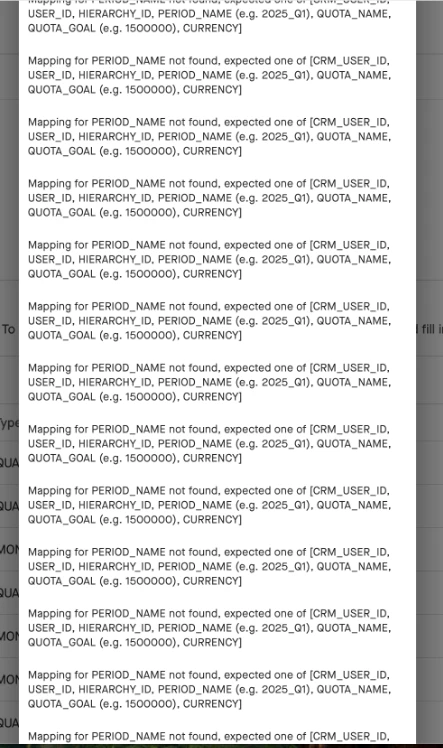
We are trying to upload a quota csv file but getting the error messages below.  We have checked our Period Name and ensured it is correct and aligned with the format set forth by the Clari Help article.  Any ideas?  https://clari.my.site.com/customer/s/article/Uploading-Quotas-in-Clari


Best answer by Kenna

Hi, ​@Liz Stuart! Thanks for reaching out. I can try to offer a few pointers to help you troubleshoot, and if they don’t work then I would recommend opening a case with our support team to investigate further.

The error suggests that the provided period name does not match any of the expected values, although I understand that you’ve double-checked it.

My first suggestion would be to ensure that the period name in your CSV file follows the correct format. It should typically be in the format of YYYY_Q1 for quarterly periods or YYYY_M1 for monthly periods. However, I understand that you already checked the formatting in the troubleshooting you have done so far.

Here are a few other things to double-check that might help:

  1. Correct Column Headers: Verify that the column headers in your CSV file are properly capitalized and match the expected values exactly.

  2. CSV Formatting: Double-check that your CSV file is saved correctly with comma-separated values and does not contain any special characters or extra spaces in the column names or data values.

Hope this helps, but don’t hesitate to reach out to Support to take a closer look if the issue persists!


2 replies

Kenna
Community Manager
Forum|alt.badge.img+18
  • Community Manager
  • Answer
  • February 20, 2025

Hi, ​@Liz Stuart! Thanks for reaching out. I can try to offer a few pointers to help you troubleshoot, and if they don’t work then I would recommend opening a case with our support team to investigate further.

The error suggests that the provided period name does not match any of the expected values, although I understand that you’ve double-checked it.

My first suggestion would be to ensure that the period name in your CSV file follows the correct format. It should typically be in the format of YYYY_Q1 for quarterly periods or YYYY_M1 for monthly periods. However, I understand that you already checked the formatting in the troubleshooting you have done so far.

Here are a few other things to double-check that might help:

  1. Correct Column Headers: Verify that the column headers in your CSV file are properly capitalized and match the expected values exactly.

  2. CSV Formatting: Double-check that your CSV file is saved correctly with comma-separated values and does not contain any special characters or extra spaces in the column names or data values.

Hope this helps, but don’t hesitate to reach out to Support to take a closer look if the issue persists!



Forum|alt.badge.img+3
  • Author
  • New Contributor
  • February 20, 2025

Hey ​@Kenna Thanks so much for your response!  We figured it out last night and good to know!  Have a great rest of your week.


Liz