Answer

Tagging Opportunities For Visual Review

  • October 4, 2022
  • 6 replies
  • 101 views

There is a way to Star an opportunity, which is incredibly useful.  I’m looking for a way to tag deals so that I can visually see to which area a deal relates.  

For example, my team operates in an overlay fashion and I can use filters by sales rep or by opportunity owner.  Depending on the deal you can either be a rep or owner, or both.  However, I’m looking for an easy way to say, for example, region A, region B or region C. I thought about the use of tagging inside Clari to then add a filter.  Is there a way to do something like this?


Thanks

Best answer by canbasher

Hi @Mark Gowdy , it seems that you would want to tag and store that tag.  I’m not sure if you can do that with a label in Clari but definitely if you create a field in SF and make sure it pulls into the Clari then you can create all sorts of reporting and if its a pick-list field, update the field in Clari.  Now you will also have that in SF and it may be useful for others who may not have Clari license as well.   Anyhow, just another way to think of it.  Good Luck!

6 replies

canbasher
New Contributor
Forum|alt.badge.img+1
  • New Contributor
  • Answer
  • October 12, 2022

Hi @Mark Gowdy , it seems that you would want to tag and store that tag.  I’m not sure if you can do that with a label in Clari but definitely if you create a field in SF and make sure it pulls into the Clari then you can create all sorts of reporting and if its a pick-list field, update the field in Clari.  Now you will also have that in SF and it may be useful for others who may not have Clari license as well.   Anyhow, just another way to think of it.  Good Luck!


MikeAdams
Thought Leader
Forum|alt.badge.img+1
  • Thought Leader
  • November 1, 2022

Great point @canbasher ,

If you add a field on the opportunity to tag the relevant Region, you would be able to configure that as a filter in Clari to see “All deals in Region A, B, C, etc.”


  • Engaged Member
  • November 9, 2022

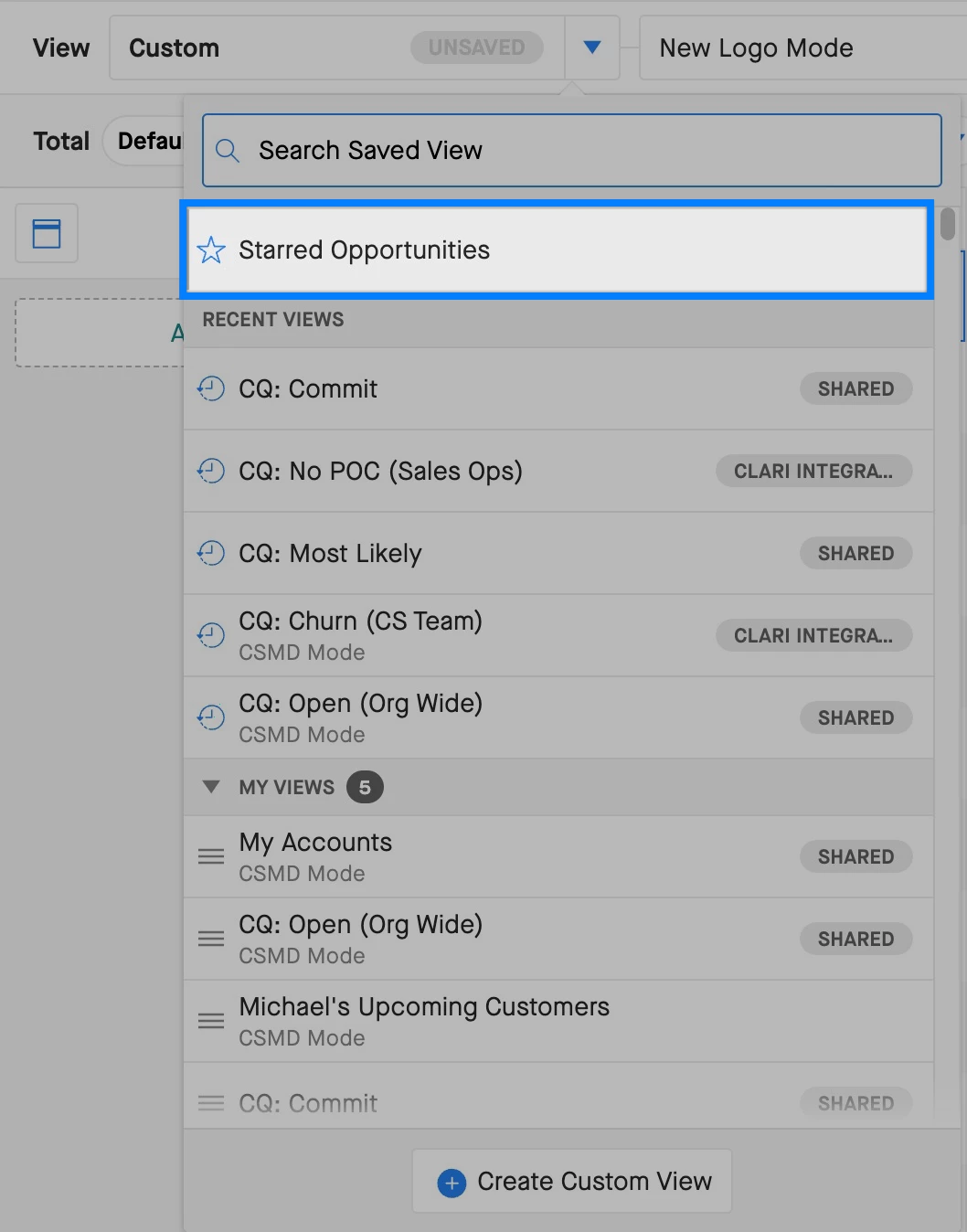
Is there a way to filter on deals we’ve starred? 


MikeAdams
Thought Leader
Forum|alt.badge.img+1
  • Thought Leader
  • November 10, 2022

@Mitesh Sedani Each user can filter for the deals that they have specifically starred in their own instance.

This list of starred deals is only visible to the user who starred the deals.


  • Engaged Member
  • November 10, 2022

I can't see a way to filter on the starred deals? there is no filter for this….


MikeAdams
Thought Leader
Forum|alt.badge.img+1
  • Thought Leader
  • November 10, 2022

Hi @Mitesh Sedani - You should be able to find your Starred Opportunities in your Saved View menu.