Answer

Quarterly and Annual Quota in the same file

  • February 27, 2025
  • 1 reply
  • 42 views

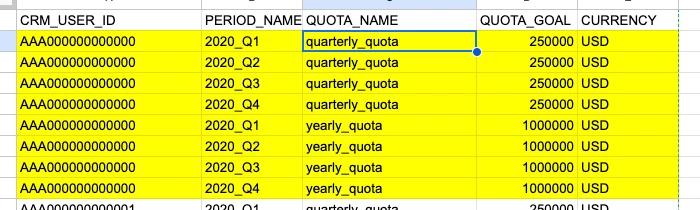
We have a requirement to upload our sales quota which would have quarterly and yearly goals. Houw should we set it up in terms of period. I saw a sample file in KB, where for a given user there were 8 rows. Is this the correct way to upload? In our Instance, the sum of quarter will not always equal to the annual.


Best answer by Kenna

Hi, ​@Abhirup Dutta! This depends on how you have your Forecast Tabs and quotas set up in Clari. With the latest version of Quota Management that you have in your Clari instance, you can actually go directly to Quota Management in Clari Studio, select the Forecast Tabs that you need to upload your quotas for, and download a file in the correct format so that you can download the file already prepopulated with all your CRM_USER_ID and QUOTA_NAME columns. Regarding the yearly quotas, please see below for how to input those in the file so they can upload successfully. It’s really just describing what you see in the example you found above, and you can input whatever values you need to in the QUOTA_GOAL column (even if the sum of quarters does not always equal the annual quota).


PERIOD_NAME

  • Fiscal quarter that the quota applies to (Year example: 2022, 2201, etc. / Quarter example: 2018_Q1, 2018_Q2, etc. / Month example: 2018_M1, 2018_M2, etc.)
  • You can upload yearly quotas (assuming you have a field for one in Clari). You must include the yearly quota for each individual for each fiscal period/quarter. 

1 reply

Kenna
Community Manager
Forum|alt.badge.img+18
  • Community Manager
  • Answer
  • February 28, 2025

Hi, ​@Abhirup Dutta! This depends on how you have your Forecast Tabs and quotas set up in Clari. With the latest version of Quota Management that you have in your Clari instance, you can actually go directly to Quota Management in Clari Studio, select the Forecast Tabs that you need to upload your quotas for, and download a file in the correct format so that you can download the file already prepopulated with all your CRM_USER_ID and QUOTA_NAME columns. Regarding the yearly quotas, please see below for how to input those in the file so they can upload successfully. It’s really just describing what you see in the example you found above, and you can input whatever values you need to in the QUOTA_GOAL column (even if the sum of quarters does not always equal the annual quota).


PERIOD_NAME

  • Fiscal quarter that the quota applies to (Year example: 2022, 2201, etc. / Quarter example: 2018_Q1, 2018_Q2, etc. / Month example: 2018_M1, 2018_M2, etc.)
  • You can upload yearly quotas (assuming you have a field for one in Clari). You must include the yearly quota for each individual for each fiscal period/quarter.