


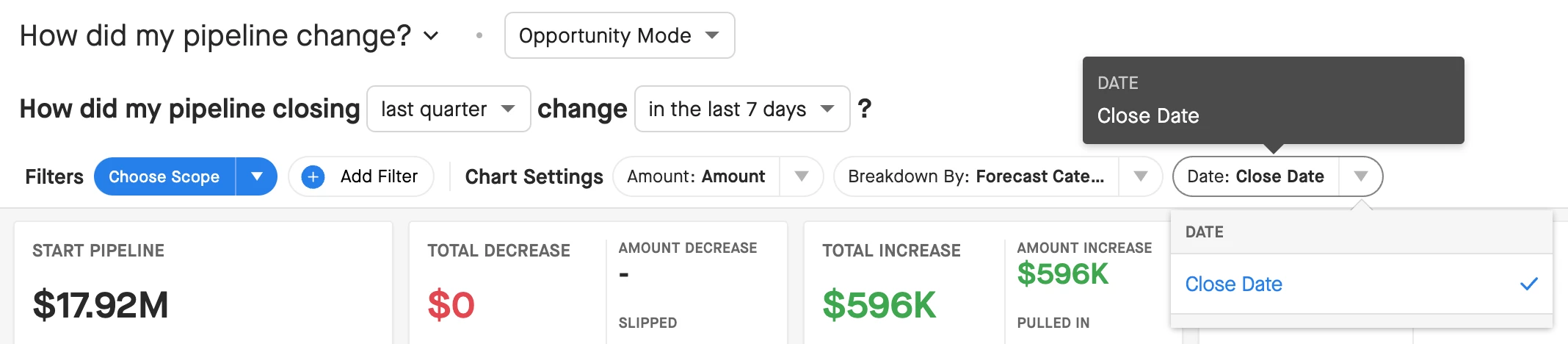
Love this new feature that shows the actual change between the selected date range in each of the Waterfall buckets. Currently Clari is only using CLOSE DATE. Just hoping this may be customizable in the near future as our business uses our custom field of BOOKING DATE (a combination of Start & Close). We also utilize FORECASTED CHURN DATE on the churn side. So CLOSE DATE is not ideal and I thought we were told that Waterfall / Clari analytics uses our BOOKING DATE not CLOSE DATE (what our Clari rep told us) How did my pipeline closing “this quarter” change 10/01/24-10/22/24”. We had asked since we use BOOKING DATE, that we cannot use CLARI if it not pulling deals and the analytics for these deals by our BOOKING DATE.

New Waterfall Pipeline change (right window show actual changes)




Sign up
Please create your account below.
Clari customers and employees with an app.clari.com login can click the first blue Log in button below.
Align, Copilot, or Groove customers, Clari Partners, or other guests can enter a username and password below to log in.
Please reach out at community@clari.com if you need any help to log in.
Log in
Clari customers and employees with an app.clari.com login can click the first blue Log in button below.
Align, Copilot, or Groove customers, Clari Partners, or other guests can enter a username and password below to log in.
Please reach out at community@clari.com if you need any help to log in.
or
Welcome to the community
Create your account
Not a member yet? Join the Clari Circle Community to learn about our products, fine tune your craft, and accelerate your revenue career.
Create an accountClari customers and employees with an app.clari.com login can click the first blue Log in button below.
Align, Copilot, or Groove customers, Clari Partners, or other guests can enter a username and password below to log in.
Please reach out at community@clari.com if you need any help to log in.
Log in
Clari customers and employees with an app.clari.com login can click the first blue Log in button below.
Align, Copilot, or Groove customers, Clari Partners, or other guests can enter a username and password below to log in.
Please reach out at community@clari.com if you need any help to log in.
or
Enter your E-mail address. We'll send you an e-mail with instructions to reset your password.