Question

Log Email attachments to Files instead of Attachments

  • February 19, 2025
  • 4 replies
  • 75 views

Forum|alt.badge.img
  • New Contributor

The “Notes & Attachments” in Salesforce is Classic Only and has been deprecated in Lightning.  Please upload email attachments to the File settings so people don’t have to look in multiple places (or admins don’t have to do hacky workarounds) to find their files.


4 replies

Kenna
Community Manager
Forum|alt.badge.img+18
  • Community Manager
  • February 20, 2025

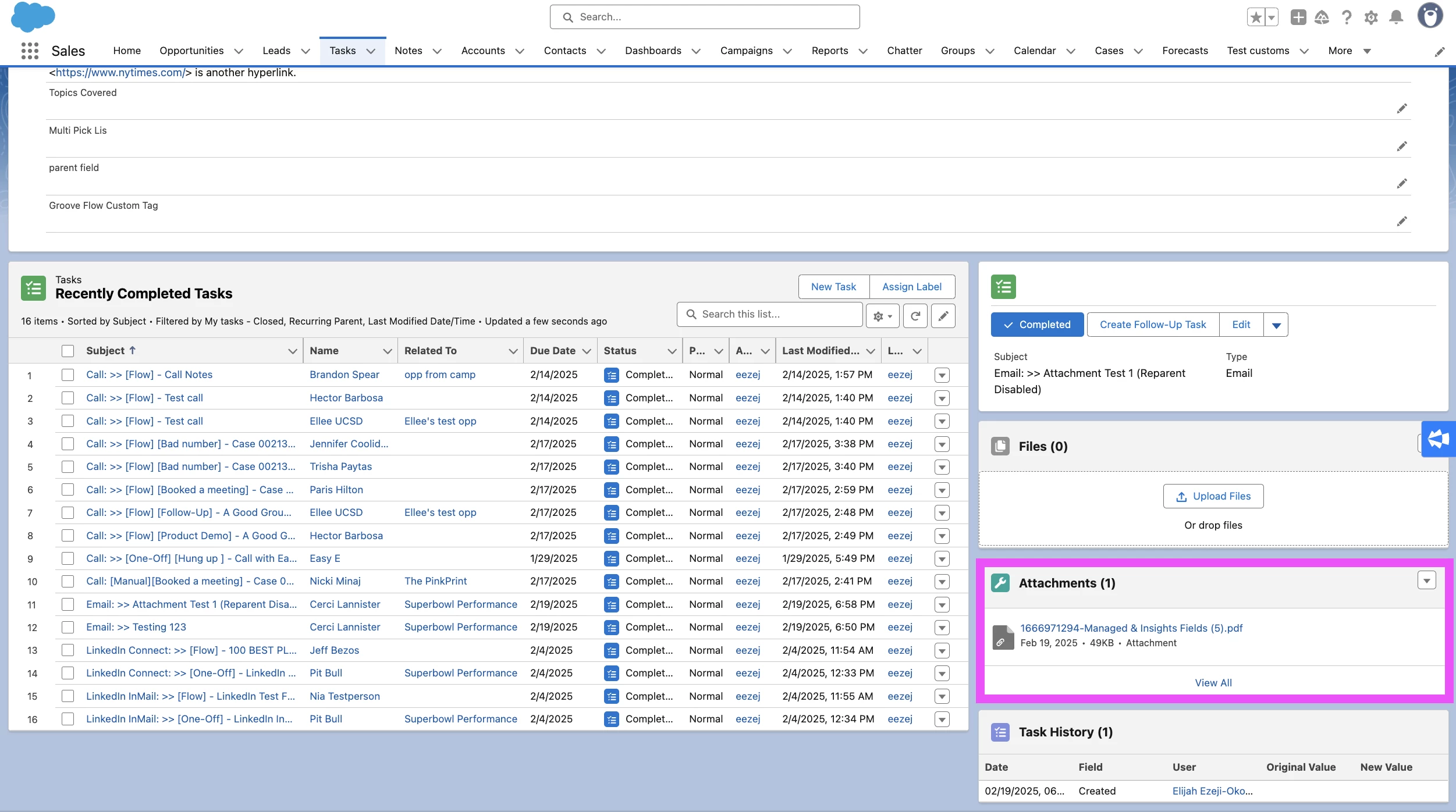
Hello, ​@Kez! Where we would expect these attachments to go in Salesforce depends on if you have Reparent Email Attachments enabled in your Profile Settings in Groove or not.


If Reparent Email Attachments is Disabled
In both Salesforce Classic and Salesforce Lightning, attachments are saved to the "Attachments" Related List on the Task record (example of what this looks like in Lightning below):


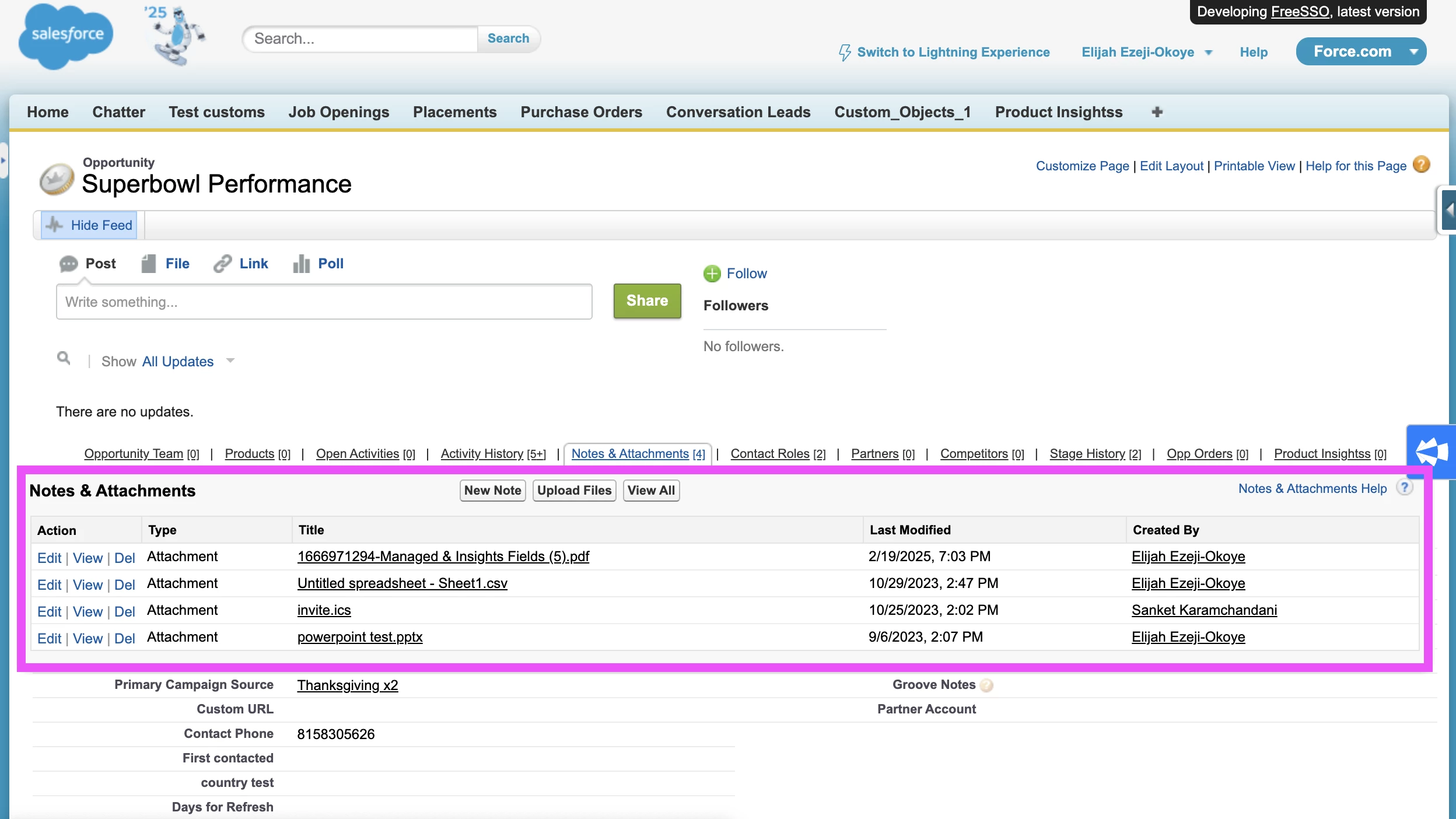
If Reparent Email Attachments is Enabled
In both Salesforce Classic and Salesforce Lightning, attachments save to the "Notes & Attachments" Related List on the lead, contact, opportunity, case, or contact record to which the task record is related. Groove will also detect and prevent duplicates.

You can still have the Notes and Attachments in Salesforce Lightning and that is where attachments would go when this setting is enabled (for example): 


Essentially, with this setting, Groove will use the below criteria to match your attachment to the appropriate record:

  • If the Task has a value in the "Related To" (i.e., WhatId) field, then the attachment will appear on that record's "Notes and Attachments" Related List
  • If the Task has no value in the "Related To" (i.e., WhatId) field and only has a value in the Name (i.e., WhoId) field, then the Task will appear on that record's "Notes and Attachments" Related List


If you would like to change where where attachments are stored, then we can submit an idea to our product team to consider the ability to configure/customize that mapping in our product roadmap! 

There’s also the possibility of using a Salesforce Flow today to move attachments from where Reparent Email Attachments stores them, but I understand that’s probably not ideal.

Finally, if you’re not seeing attachments in the above places (as applicable based on your Reparent Email Attachment setting), then I would recommend submitting a case to our Support team so that we can investigate this for you.


Forum|alt.badge.img
  • Author
  • New Contributor
  • February 20, 2025

Hi Kenna,

Thanks for the detailed response.  I do not want the attachments to go into the Attachments object at all (this includes both Attachments on Task and Notes & Attachments on parent records).  Salesforce has deprecated this object in Lightning in favor of their new Files structure.  Yes you can view Attachments in lightning, but you can’t add new ones (can only add Attachments via api or Classic).  Groove using this old object, now means that some of our files are in the Files object and some are in the Attachments object, and thus our users now have to look in two different places to see files.  This is really not ideal.  Please allow us the option to use the Files object.


Side note: it is not possible to move Attachments to Files with Salesforce Flows - only Apex.  I may end up having to do that if Groove has no plans to ever use Files, but I’d like to avoid it.


Kenna
Community Manager
Forum|alt.badge.img+18
  • Community Manager
  • February 20, 2025

Ah, thank you for the clarification, ​@Kez. Totally agree with you here. Would you be so kind as to share your feedback here as a product idea? This will share it directly to our product team’s feedback repository so they can review and consider it for our product roadmap (if they’re not already; usually as a general practice they make a point to keep up with any changes to Salesforce that impact our users’s experience). It also has the added benefit of ensuring that I update the status of your idea so you can keep updated on when it’s on our roadmap, in development. etc.


Forum|alt.badge.img
  • Author
  • New Contributor
  • February 20, 2025

Done!