




There are a couple ways, both manual and automated, that you can remove all Contacts at an Account from a Flow.
Manual Method 1: The Accounts Page
The first way to remove all Contacts at an Account from a Flow would be from the Accounts Page, found here.
- Click on the name of the Account whose Contacts you want to remove from your Flows
- Select the checkbox to the left of the ‘Name’ header to select all Contacts (or individually select which Contacts you’d like to remove)
- Select ‘Remove From All Active Flows’
- Press the ‘Remove’ button in the pop-up window to confirm the removal
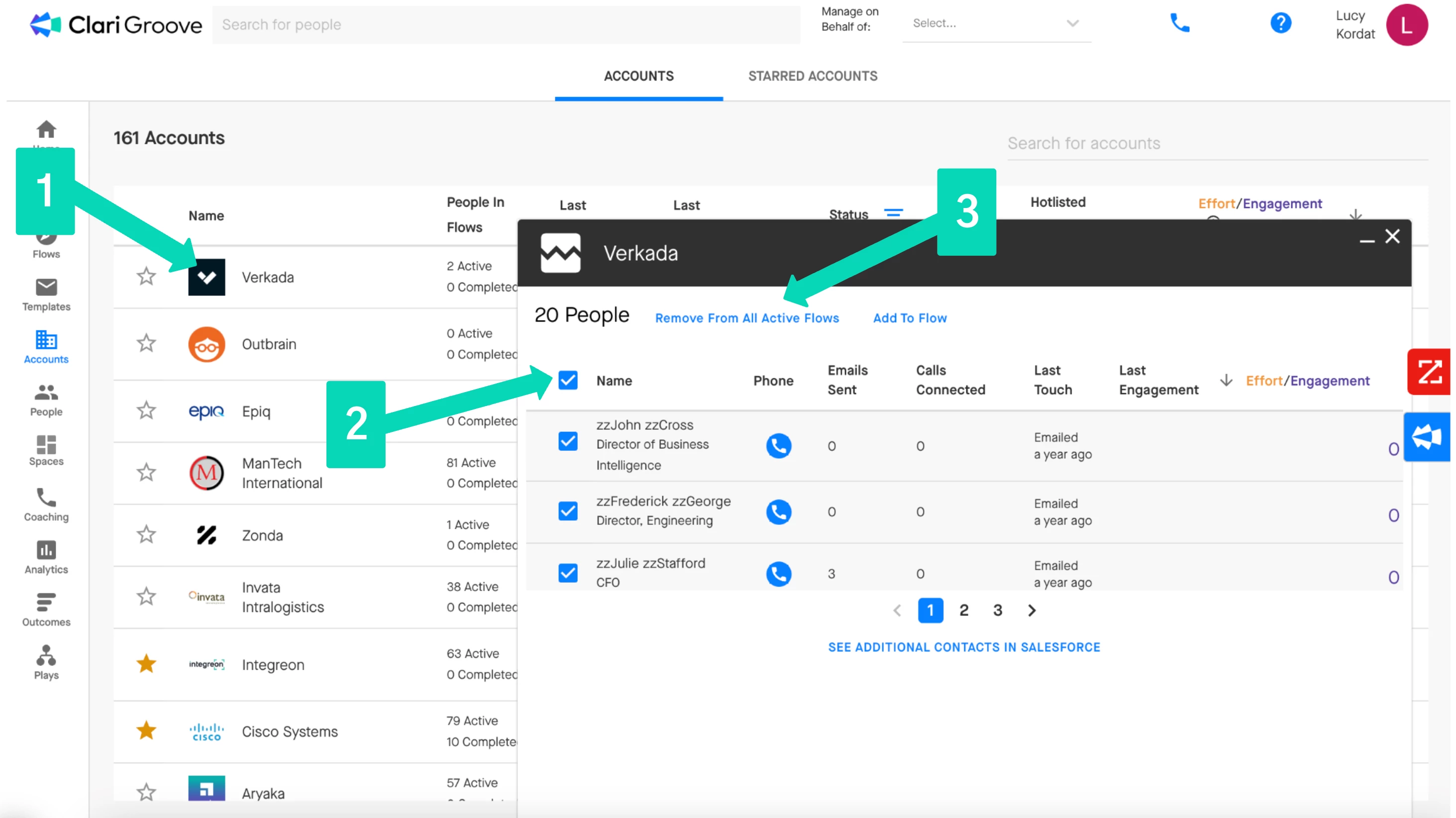
Important Notes: Please see the below notes to help avoid any confusion.
- Groove will only allow you to remove Contacts from Flows where you are managing them. Groove will not allow you to remove Contacts from a Flow that is being managed by another teammate. To remove Contacts that a teammate is managing in a Flow, we recommend reaching out to the teammate and asking them to remove those Contacts.
- The metrics under the ‘People in Flows’ column for the Account will not change after you complete the removal. The ‘Active’ count includes the total number of Flows that Contacts at the Account are currently active in plus the total number of Flows that Contacts at the Account have been removed from prior to them completing the Flow. The ‘Completed’ count is just the total number of Flows that Contacts at the Account have completed in their entirety.
Manual Method 2: Groove Spaces
The second way to remove Contacts at an Account from a Flow would be from a Groove Space where you have the Account added. Groove Spaces can be found here in the Groove web app.
- Open up your Space that has the Account added in it
- Click on the name of the Account whose Contacts you want to remove from your Flows
- Select the checkbox to the left of the ‘Name’ header to select all Contacts (or individually select which Contacts you’d like to remove)
- Select ‘Remove From All Active Flows’
- Press the ‘Remove’ button in the pop-up window to confirm the removal
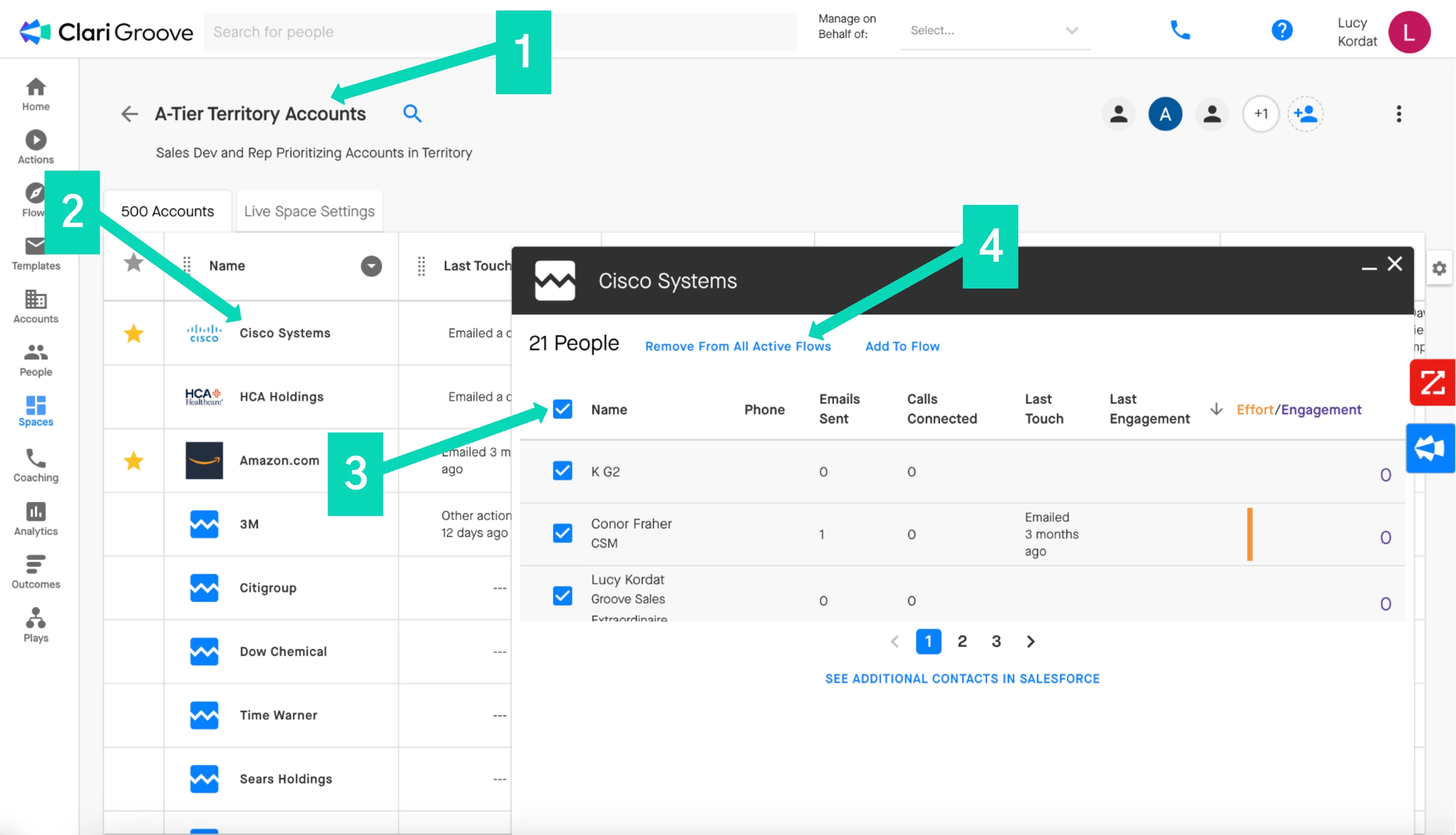
Important Notes: Please see the below notes to help avoid any confusion.
- Groove will only allow you to remove Contacts from Flows where you are managing them. Groove will not allow you to remove Contacts from a Flow that is being managed by another teammate. To remove Contacts from a teammates Flow, we recommend reaching out to the teammate and asking them to remove the Contacts as well.
Automated Method: Automated Actions
The last way to remove all Contacts at an Account from a Flow would be by setting up an Automated Action. Automated Actions listen for certain triggers (or criteria) to be fulfilled across your instance. When a trigger criteria is satisfied, Groove will fire the corresponding action.
One of the actions Groove can trigger is the ‘Remove Everyone in This Account from This Flow’ action. With this action, when the trigger criteria is satisfied by one Contact that is active in the Flow, that Contact and all other Contacts attached to the same Salesforce account will be removed from the Flow. A list of triggers that can be paired with this automated action can be found here.
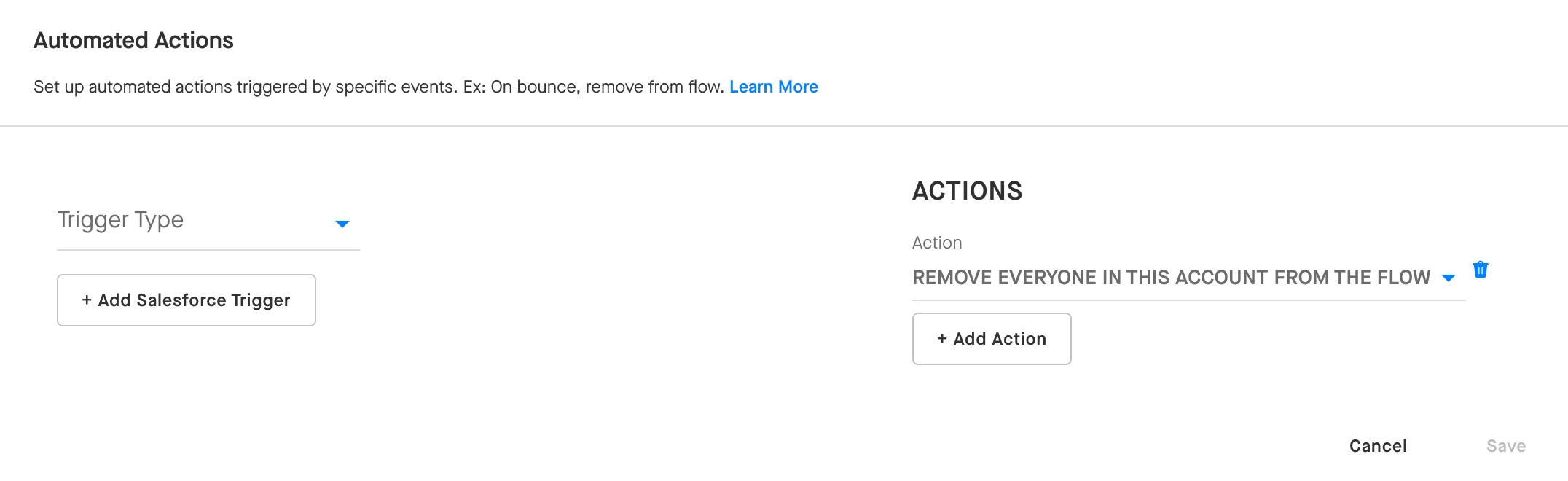
There are a few different scopes at which Automated Actions can be configured. The outcome of this Automated Action will change slightly depending on the scope it is assigned.
- Individual Flow: If this Automated Action is configured for a specific Flow (from the ‘Settings’ tab of that Flow), Groove will pay attention for any Contacts that meet the trigger conditions as they are progressing through that same Flow. When the trigger conditions are met for a given Contact, that Contact will be removed from the Flow. Any other Contacts at the same Account that are active in that same Flow will also be removed.
- Collection: If this Automated Action is configured for a specific Collection, Groove will pay attention for any Contacts that meet the trigger conditions as they are progressing through any of the Flows saved in that Collection. When the trigger conditions are met for a given Contact, that Contact will be removed from the Flow. Any other Contacts at the same Account in the same Flow will also be removed.
- Global (Admins Only): If this Automated Action is configured as a Global Automated Action (from Manage My Org > Automated Actions), Groove will pay attention for any Contacts that meet the trigger conditions as they are progressing through any Flows at your organization. When the trigger conditions are met for a given Contact, that Contact will be removed from its Flow. Any other Contacts at the same Account in the same Flow will also be removed from their Flows.