

How am I able to set the default log on screen to the opportunities tab? Currently it defaults to a Dashboard.
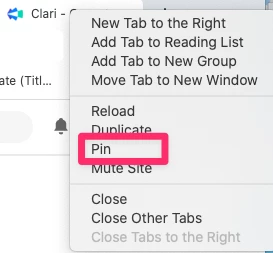
Also, using Chrome, is there a way to pin the Clari page in the Bowser so Clari is always a tab that is available?
Thanks,
Pat Kenny

How am I able to set the default log on screen to the opportunities tab? Currently it defaults to a Dashboard.
Also, using Chrome, is there a way to pin the Clari page in the Bowser so Clari is always a tab that is available?
Thanks,
Pat Kenny
Best answer by jessica_starr
Hi
As for pinning Clari to a page in the browser, I believe if you right click the tab and select pin, that might do the trick.
Happy new year!
Jessica
Please create your account below.
Clari customers and employees with an app.clari.com login can click the first blue Log in button below.
Align, Copilot, or Groove customers, Clari Partners, or other guests can enter a username and password below to log in.
Please reach out at community@clari.com if you need any help to log in.
Not a member yet? Join the Clari Circle Community to learn about our products, fine tune your craft, and accelerate your revenue career.
Create an accountClari customers and employees with an app.clari.com login can click the first blue Log in button below.
Align, Copilot, or Groove customers, Clari Partners, or other guests can enter a username and password below to log in.
Please reach out at community@clari.com if you need any help to log in.
Enter your E-mail address. We'll send you an e-mail with instructions to reset your password.