

Please, I would like help with a question.When a salesperson goes on vacation, how can I configure Clari so that another salesperson can update that salesperson's forecast?

Solved
Account vacation
- New Contributor
Best answer by elijah
Hi
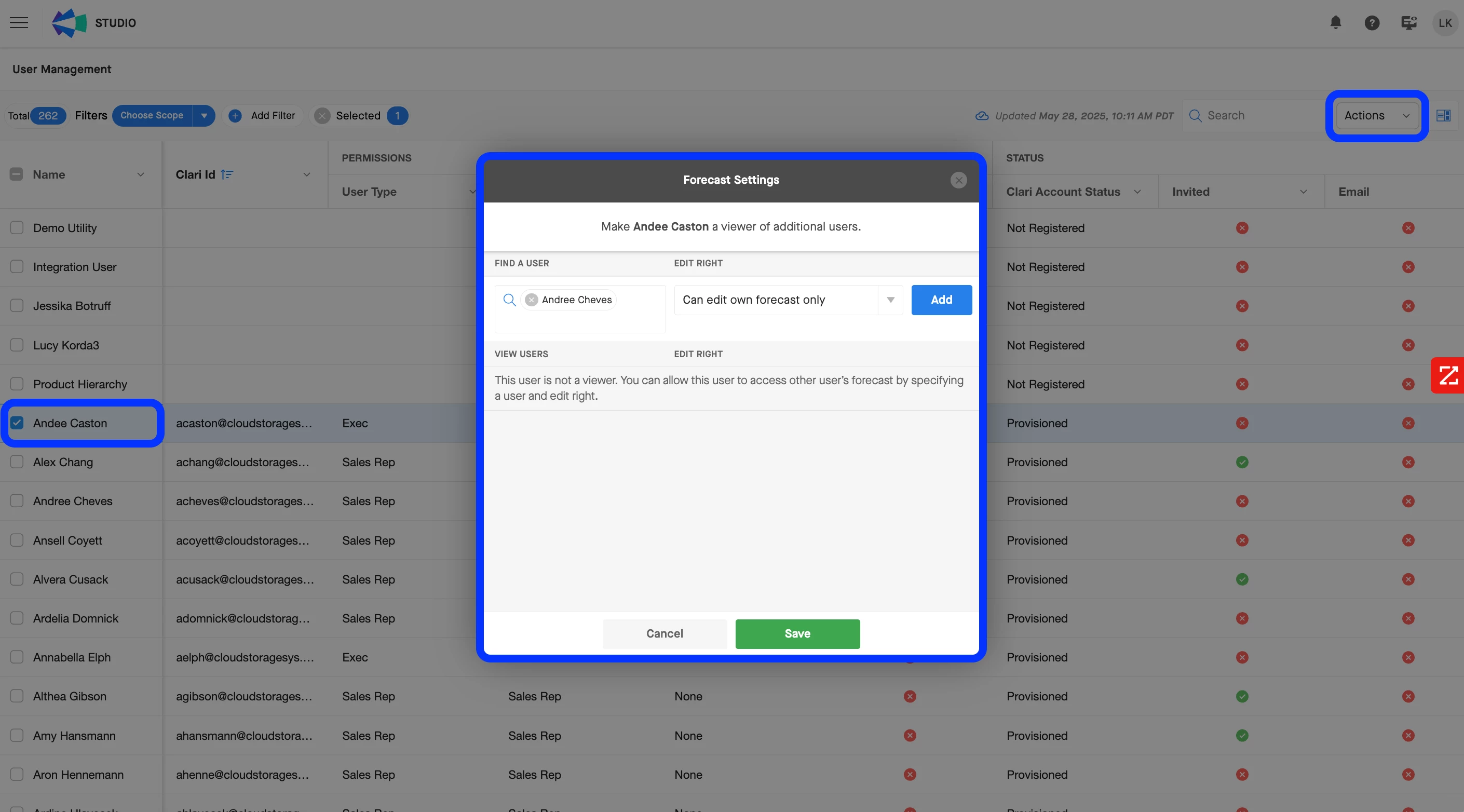
When a salesperson is on vacation, you can enable their colleague to update their Forecast by using the Forecast Sharing feature. This can be set up through the following steps.
- Open Clari Studio
- Select the user who will be covering for the salesperson who is on vacation (i.e., the user who you want to be able to update the salesperson’s Forecast)
- Click the ‘Actions’ button in the upper-right corner > Select ‘Set as Viewer’
- Enter the salesperson who will be going on vacation in the ‘Find a User’ search bar
- Select the appropriate edit rights
- Can edit own forecast only: This option allows the covering user to update the other person’s forecast.
- Can edit own and report’s forecast: This option allows the user to update both the vacationing salesperson’s forecast and their team's (if applicable).
- Save the configuration
This guide in our Knowledge Base contains additional information on the Forecast Sharing feature, as well as some other common use cases in which it may be helpful.
Please let me know if that helps, or if I can offer any additional insight here!




Sign up
Please create your account below.
Clari customers and employees with an app.clari.com login can click the first blue Log in button below.
Align, Copilot, or Groove customers, Clari Partners, or other guests can enter a username and password below to log in.
Please reach out at community@clari.com if you need any help to log in.
Log in
Clari customers and employees with an app.clari.com login can click the first blue Log in button below.
Align, Copilot, or Groove customers, Clari Partners, or other guests can enter a username and password below to log in.
Please reach out at community@clari.com if you need any help to log in.
or
Welcome to the community
Create your account
Not a member yet? Join the Clari Circle Community to learn about our products, fine tune your craft, and accelerate your revenue career.
Create an accountClari customers and employees with an app.clari.com login can click the first blue Log in button below.
Align, Copilot, or Groove customers, Clari Partners, or other guests can enter a username and password below to log in.
Please reach out at community@clari.com if you need any help to log in.
Log in
Clari customers and employees with an app.clari.com login can click the first blue Log in button below.
Align, Copilot, or Groove customers, Clari Partners, or other guests can enter a username and password below to log in.
Please reach out at community@clari.com if you need any help to log in.
or
Enter your E-mail address. We'll send you an e-mail with instructions to reset your password.