




Say that you’re looking to make some changes and edits for your Clari Forecasting Tab. It all seems like it would be a straightforward task…until you see this:
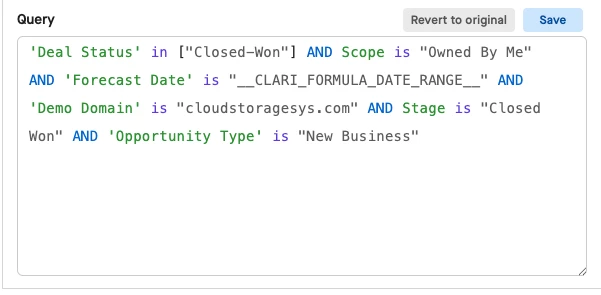
You could be thinking: “What is this? I’m not a coder! 💀”
Well, here’s some good news for you! The filter changes are not as intimidating as you would think – and here’s a quick write up guide to help you walk through how to make those forecasting changes so you can take control of your forecasting process here in Clari!
Why don’t we first go into your Clari Studios & Forecast Configuration module.
Say we need to add a new filter, say “Amount is not greater than 0” -- all we would need to do is add an AND and we can spell out the filterset we need. Keep in mind to ensure that we are adding the correct filterset by checking the appropriate SFDC API name underneath the Display name:
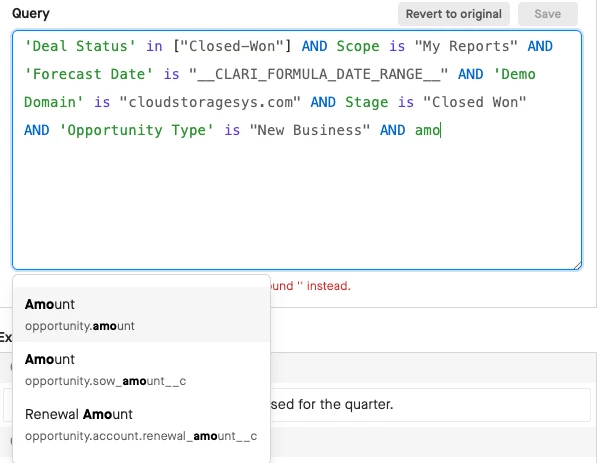
From here, we can determine how the field interacts with our conditions:
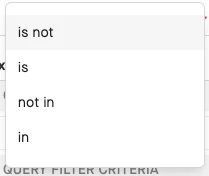
A general rule of thumb is:
Is Not - Field is NOT one condition
Is - Field is one condition
Not In - Field is NOT multiple conditions
In - Field is in multiple condition
We will go with “is not” since we have a filterset option of “< 0”. If you’d like more options to configure the field, you can create more options in Field Configuration.

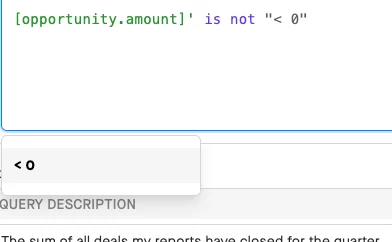
After, we can hit “Save” and add that new filterset to the column. Please make sure that you apply this to all Forecasting Roles and you select “Review and Publish” after!
P.S. If you need to do an advanced “OR” type of statement, we can do the same thing! Just add that instead of an “AND” and you can create even more flexible conditions for your filterset for your forecasting!