




Our best practice recommendation to manage email opt outs is to set up an Automated Action. You can configure Groove to take action when a Contact or Lead’s email opt-out status is updated in Salesforce. In this scenario, you would probably want your admin to set up a global Automated Action to tell Groove to remove the person from the Flow so that nobody has to manually track and update flows when Contacts and Lead opt out of emails.
If your team is tracking email opt outs in the default “Email Opt Out” (API Name: HasOptedOutOfEmails) field, you could set up this type of automated action like the one shown in the screenshot below.
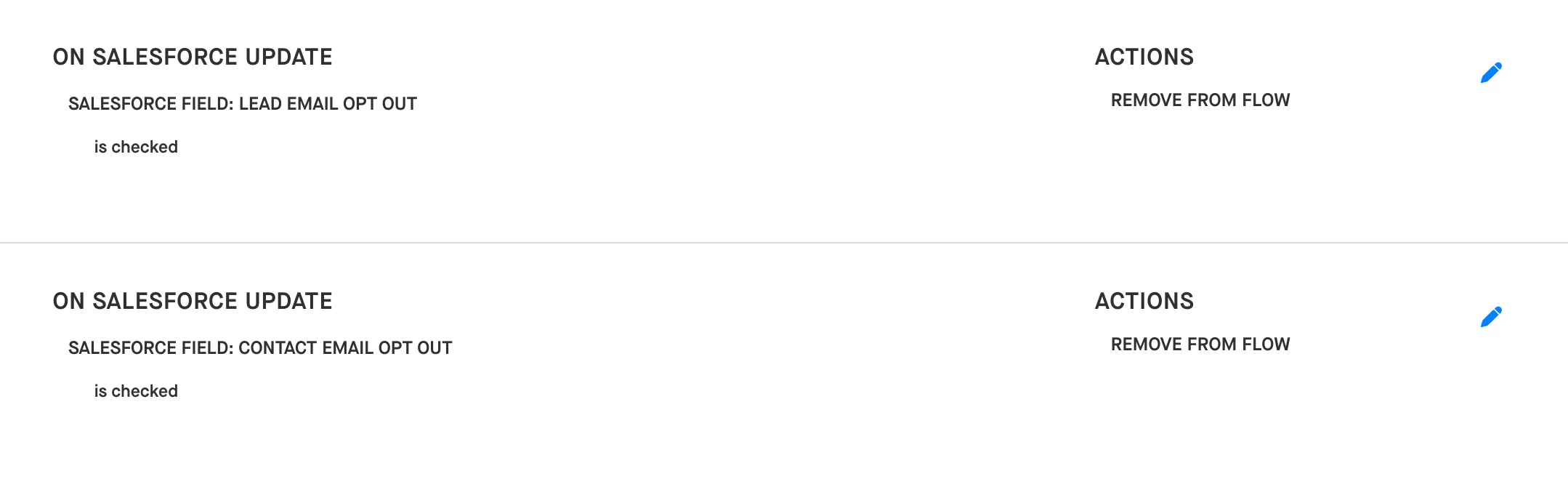
If your team has worked with the Clari support team or your CSM to configure a custom field to track email opt outs, you could set up the same type of automated action. You’d just want to select your team’s custom field where “Email Opt Out” is selected in the screenshot above.