

As a manager, can I create custom text fields that reflect our deal inspection process within Clari for my reps to fill out if it doesn’t exist in SFDC? Right now I am just having them dump all of that information into a template I created in a ‘Notes’ field, but I’d like to separate out the different questions into their own fields so that I have better visibility into what the knowledge gaps are on our deals.

Solved
Custom Fields on Opportunity Views
- New Contributor
Best answer by MikeAdams
Hi Patrick!
Clari pulls all of the fields you see in the grid, filter, and grouping options directly from your CRM, so you may need to engage with your Clari Admin to get those fields configured in SFDC and added to your Clari configuration.
Are these custom fields related to your sales methodology? (MEDDIC, SNAP, etc.)
We commonly see our customers separate their methodology fields into a series of notes fields that reps can fill out in Clari.
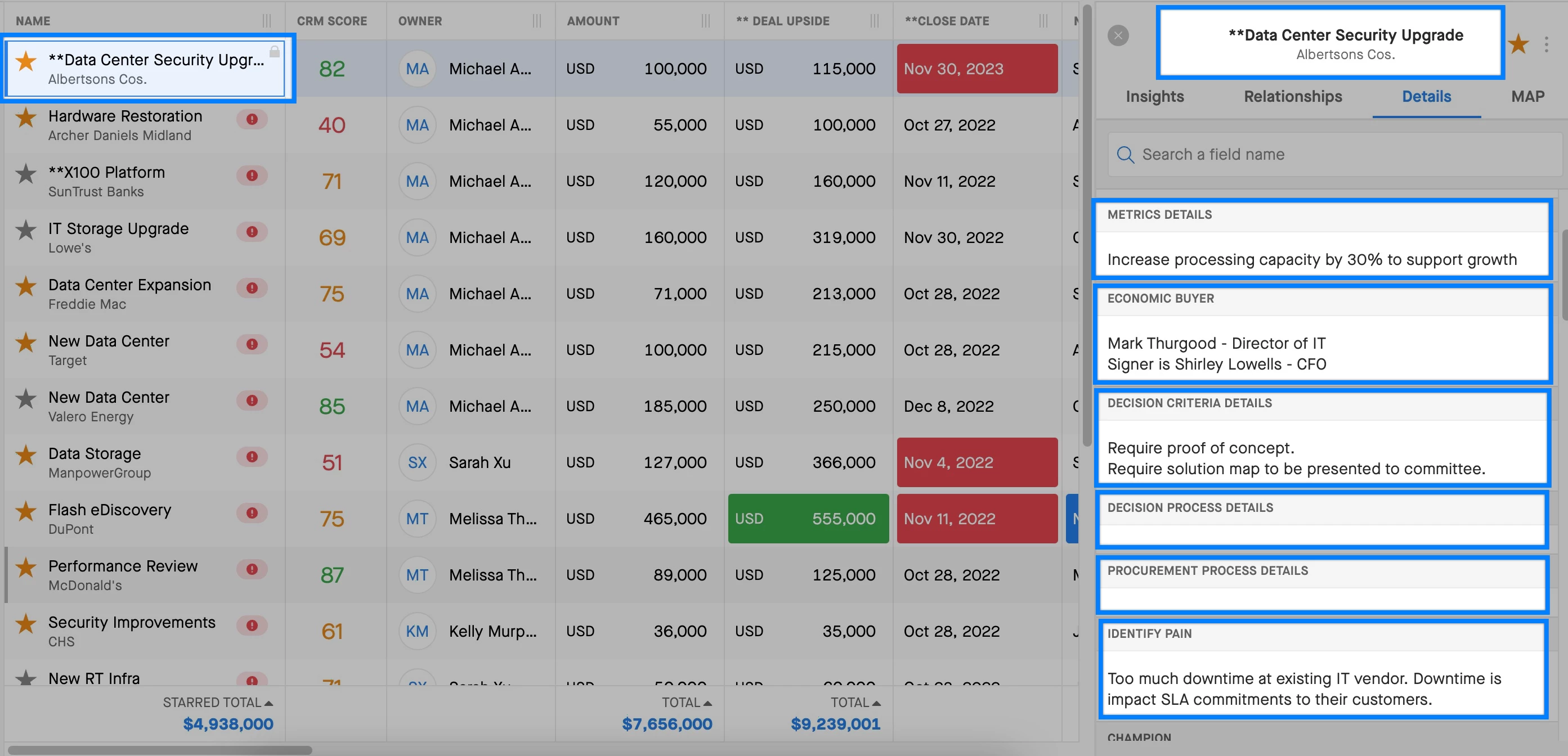
Using MEDDPIC as an example, your SFDC admin would set up a field for each step of your sales methodology:
- Metrics Details
- Economic Buyer
- Decision Criteria
- Decision Process
- Procurement Process
- Identify Pain
- Champion
Once these fields are created, they can be added to your configuration. Generally, customers will put sales methodology fields in the details panel to help make deal inspection as simple as possible (example below)




Sign up
Please create your account below.
Clari customers and employees with an app.clari.com login can click the first blue Log in button below.
Align, Copilot, or Groove customers, Clari Partners, or other guests can enter a username and password below to log in.
Please reach out at community@clari.com if you need any help to log in.
Log in
Clari customers and employees with an app.clari.com login can click the first blue Log in button below.
Align, Copilot, or Groove customers, Clari Partners, or other guests can enter a username and password below to log in.
Please reach out at community@clari.com if you need any help to log in.
or
Welcome to the community
Create your account
Not a member yet? Join the Clari Circle Community to learn about our products, fine tune your craft, and accelerate your revenue career.
Create an accountClari customers and employees with an app.clari.com login can click the first blue Log in button below.
Align, Copilot, or Groove customers, Clari Partners, or other guests can enter a username and password below to log in.
Please reach out at community@clari.com if you need any help to log in.
Log in
Clari customers and employees with an app.clari.com login can click the first blue Log in button below.
Align, Copilot, or Groove customers, Clari Partners, or other guests can enter a username and password below to log in.
Please reach out at community@clari.com if you need any help to log in.
or
Enter your E-mail address. We'll send you an e-mail with instructions to reset your password.