




Copilot's Smart Topics, Recommended Topics, and Topic Dashboards provide a powerful suite of AI-driven features designed to help you understand customer conversations, identify key trends, and drive effective strategies.
This workflow helps you move beyond basic keyword tracking to gain contextual understanding, improve decision-making, and ultimately boost your team's performance.
💡Workflow Summary:
By combining Recommended Topics, Smart Topics, and Topic Dashboards, you can create a powerful workflow:
- Start with Recommended Topics to quickly identify key areas to focus on.
- Use Smart Topics to refine your tracking and ensure you're capturing the nuances of your conversations.
- Leverage Topic Dashboards to visualize trends, segment data, and gain actionable insights to improve your sales strategies and team performance.
Now let’s dive deeper into each of these features in Copilot.
1. Discover relevant topics with Recommended Topics:
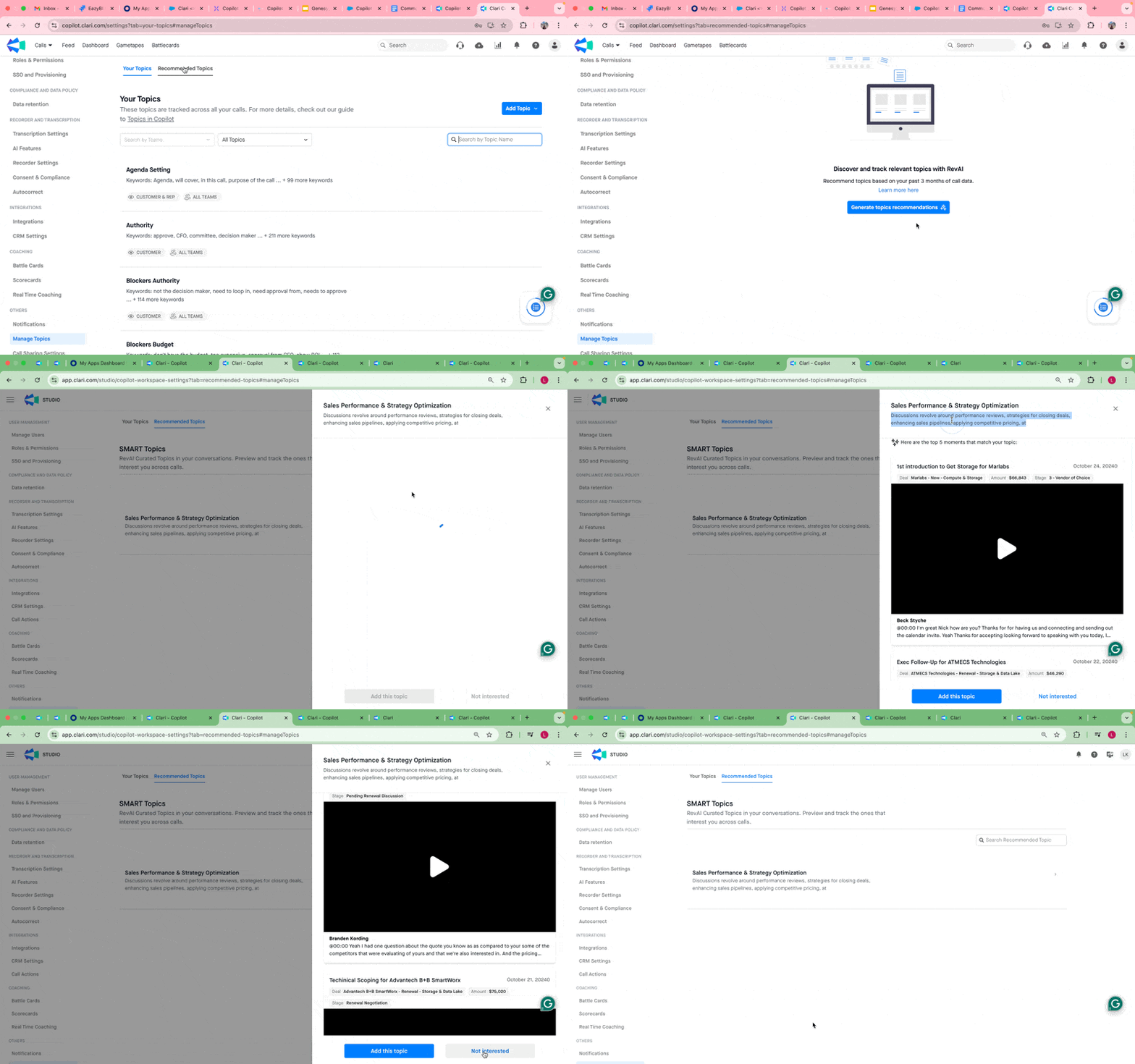
Copilot proactively analyzes your customer calls to suggest relevant themes and subjects for tracking. This eliminates the guesswork of setting up topics, ensuring you capture what's most important in your customer interactions.
Value:
- Save time and effort in topic setup
- Identify crucial themes you might have missed
- Ensure higher data quality and accuracy from the start
How to use it:
- Copilot Admins initiate Topic Recommendations in Topic Management Settings.
- Browse and search the recommended topics.
- Preview snippets to understand the context of each topic.
- Save relevant topics or dismiss those that are not needed.
2. Create Contextually Accurate Topics with Smart Topics
Smart Topics, powered by AI, allow you to create custom topics that go beyond simple keyword searches. Describe the topic in natural language, and Copilot's AI will identify relevant conversations with greater precision and less noise.
🧠 Why Smart Topics Is Better Than Keywords:
With old keyword tracking, you had to list every possible word someone might use. If you missed a variation, it got skipped. Smart Topics understands meaning — so it catches "Is there wiggle room on pricing?" even if you didn't list the word "discount."
Value:
- Track specific business interests, trends, or features with contextual accuracy.
- Reduce noise and improve the relevance of your topic tracking.
- Gain more trustworthy insights.
How to use it:
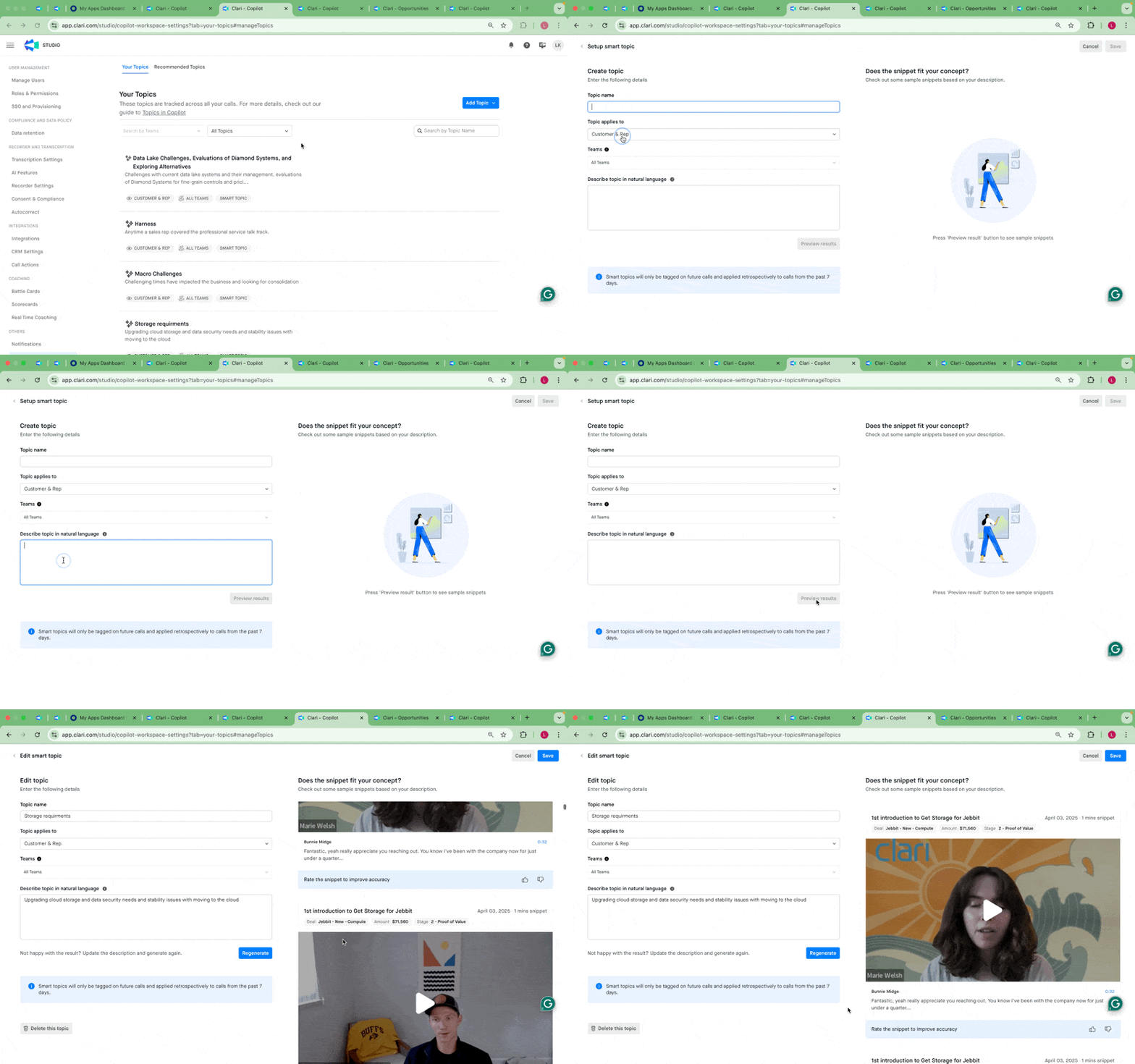
- Go to the Manage Topics tab in Copilot settings.
- Create a new 'Smart Topic' and describe it in natural language.
- Preview the results and refine your description for accuracy.
- Further configure the topic by narrowing the scope to customer/rep or specific teams.
- Save the topic.
For detailed guidance on creating effective Smart Topics, refer to the best practices and examples outlined below.
✅ What Smart Topics Does Well
Smart Topics works best when you use:
-
Clear and specific themes
- e.g., "Questions about our pricing model"
- Well-defined product or business areas
- e.g., "Integration problems with Salesforce"
- Named entities
- e.g., "Mentions of Gong as a competitor"
🚫 What Smart Topics Doesn't Handle Well
| Type | Example | Why It Doesn't Work |
|---|---|---|
| Too Broad | "Feature Requests" | Not specific enough — could mean anything from UI tweaks to product strategy |
| Contradictory Rules | "Pricing conversations, but not if it's about discounts" | Can't apply exclusions within a topic |
| Conditional Logic | "Renewal concerns only for US-based strategic customers" | Too many filters — context isn't always available in the call |
| Negative Conditions | "Customer complaints except when they're already resolved" | Smart Topics can't track things based on what didn't happen |
✔️ Good Topic Examples:
| Topic Name | Description |
|---|---|
| Pricing Discussion | Customer discusses about cost, quote structure, or pricing flexibility |
| Competitor: Acme | Acme is mentioned |
| Renewal Discussions | Discussions about renewing contracts or terms |
| Integration Discussions | Discussions around external tools or platforms |
| Product Discussions: Dashboard | Specific discussions about the dashboard experience |
| Implementation Timeline | Discussion around go-live dates, onboarding timelines, or project delays |
| Budget Discussions | Conversation around available budget, procurement, or spending limits |
| Support Response Time | Discussions related to how fast support responded or helped |
❌ Bad Topic Examples
| Topic Name | Description | Why It's a Problem |
|---|---|---|
| Feature Requests | Any mention of new features | Too vague — specify the product area or type of request |
| Concerns about Renewal | Concerns around renewal contracts and terms | Too vague, specify the type of concern |
| Pricing (no discounts) | Pricing-related questions excluding discounts | Contradictory — exclusions can't be handled |
| VIP Concerns | Complaints only from VIP accounts | System doesn't know who is a VIP without additional context |
| Objections unless handled | Objections not already addressed | Requires knowledge of what was previously resolved — not available in transcript |
| Support during Renewals | Support questions, but only when discussed during a renewal | Mixing two concepts — better to create two simple topics |
💎 Best Practices for Writing Smart Topic Descriptions:
- Be Specific: Clearly define the context or feature you want to track. Avoid generic terms that could be interpreted in multiple ways.
- Use Contextual Details: Include details about the scenario in which the topic is discussed (e.g., product demos, customer onboarding).
- Avoid Ambiguity: Mention specific terms or phrases to help the system differentiate between similar concepts.
- Avoid complex logic: If it sounds like a rulebook, simplify it.
- Iterate and Refine: If your description does not yield the desired results, refine it to make it more precise and descriptive. Use real-time feedback to guide your adjustments.
Description Examples:
Track conversations where sales representatives discuss the 'Copilot Playbook' feature specifically in the context of product demonstrations. Focus on calls where the playbook is highlighted as a tool for boosting sales productivity.
3. Analyze Topic Trends and Gain Insights with Topic Dashboards
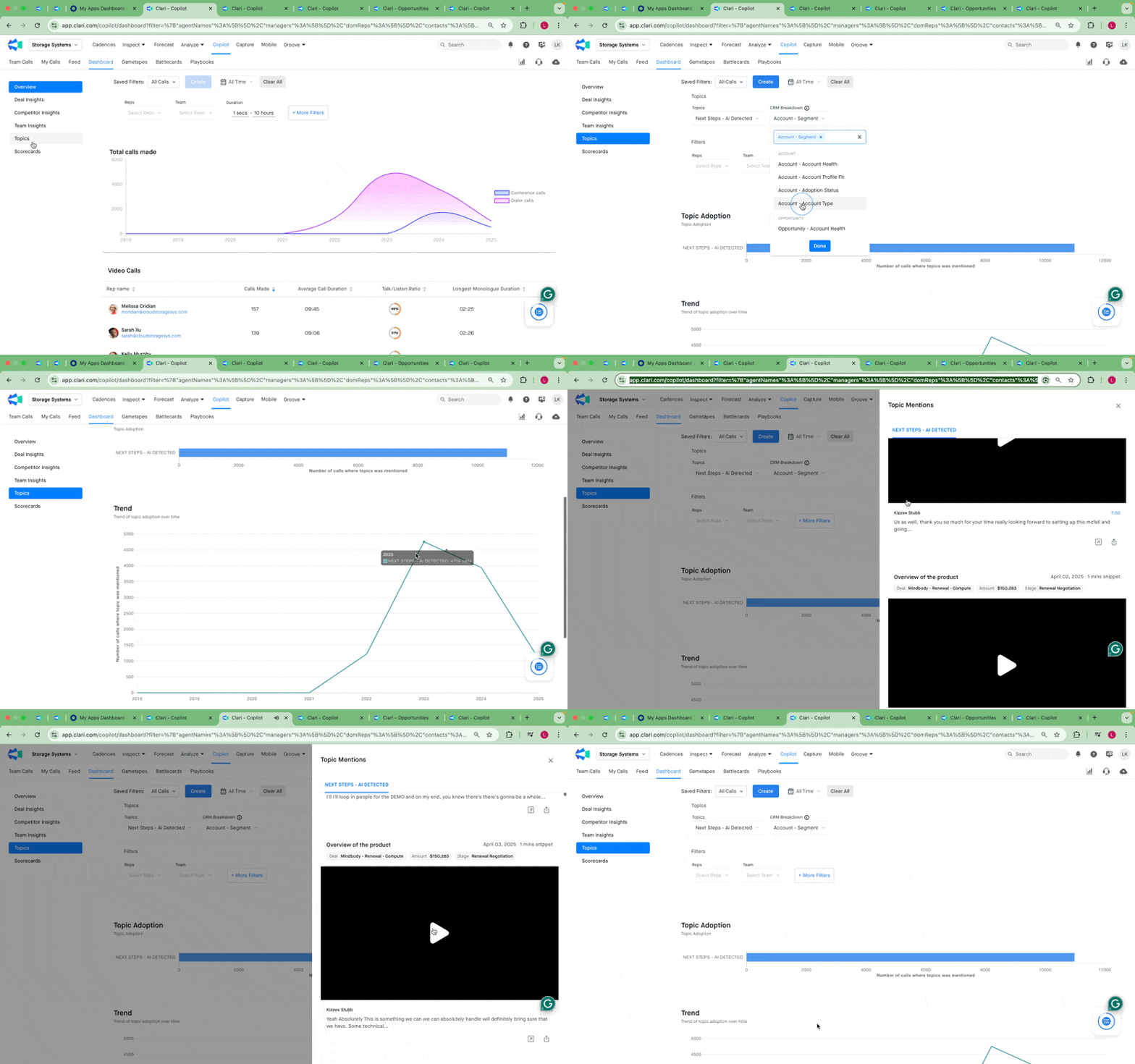
Topic Dashboards provide a user-friendly way to visualize topic trends, understand how topics relate to various segments, and drill down into specific call moments.
Value:
- Identify trends over time.
- Segment topic data by CRM attributes (e.g., deal stage, geography, market size) to uncover deeper insights.
- Quickly access specific moments in calls for review and action.
- Customize dashboards for different review cadences and specific needs.
How to use it:
- Navigate to the Copilot dashboard.
- Choose the topics you want to track.
- Apply filters to narrow down the data (e.g., by team, deal stage).
- Visualize topic mentions and trends.
- Use CRM breakdowns to segment topic data.
- Save your customized dashboard view.
- Drill down to specific call moments from the dashboards.
Additional Tips:
- Regularly review your Topic Dashboards to stay on top of key trends.
- Refine your Smart Topics as needed to maintain accuracy.
- Use the filtering capabilities to focus on specific teams, deals, or timeframes.
- Combine Smart Topics with other Copilot features like call filters and alerts for a more proactive approach. Refer to this article.