




Have you ever sent an email with multiple links and found yourself playing a guessing game? You see a notification that your recipient clicked, but which link got all the love? The one to your awesome product demo or the one to that super-niche blog post?
Don't worry, you are not alone! It is a question we get a lot in our Clari Community and we're here to demystify it for you.
While the high-level engagement data (like "clicks") is automatically captured and show up in your activity feed, figuring out which link caught their attention requires a little bit of detective work.
Here's the secret sauce:
The magic happens in your Clari Groove extension's Notification Hub!
When you get that "link clicked" notification, all you have to do is hover over it. A pop-up will appear, revealing exactly which link your recipient clicked. It's a quick, easy, and super satisfying way to get the full picture of their engagement.
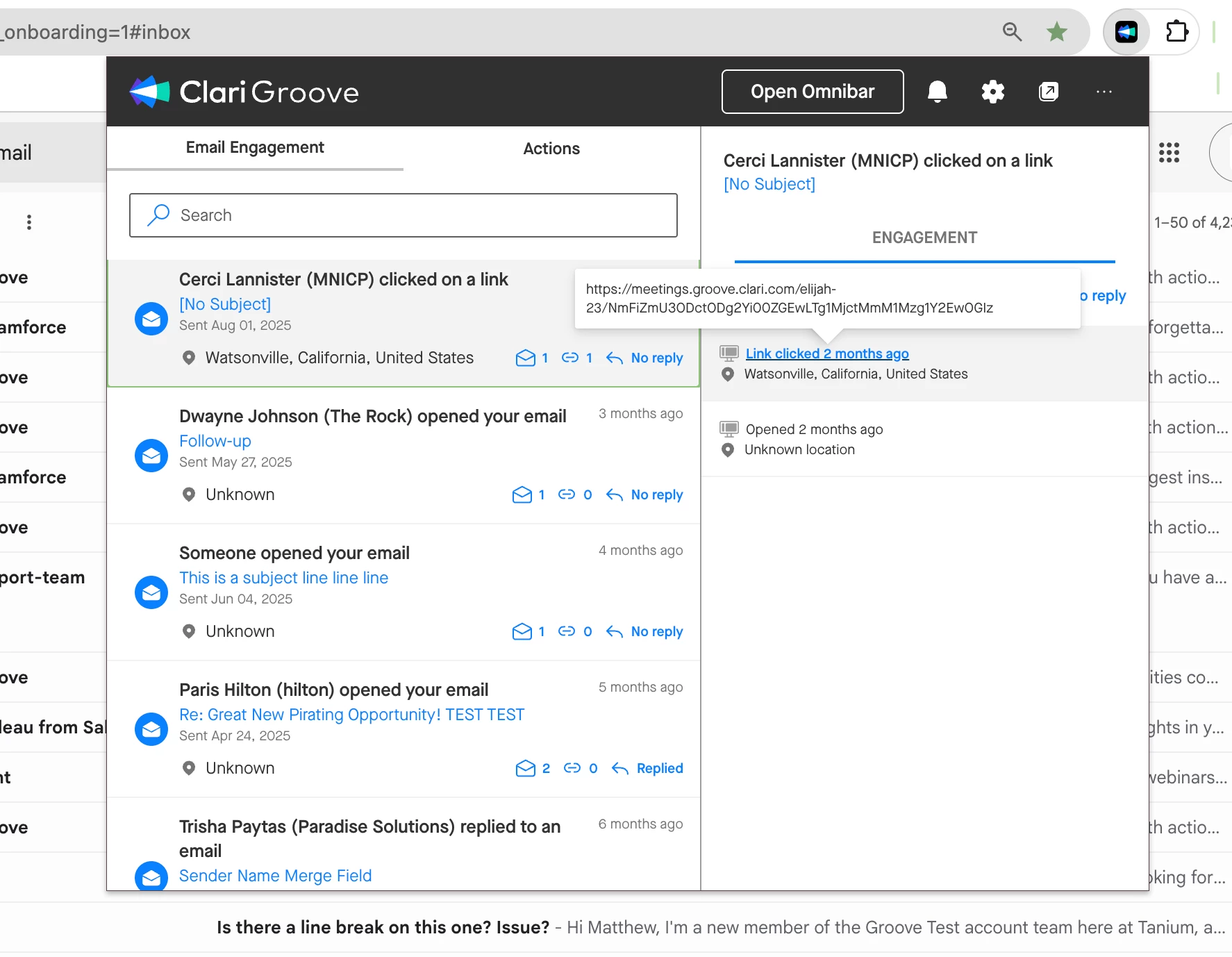
A few things to keep in mind:
- This insight is for your eyes only. This information is for the user who sent the email and is not written back to the SFDC Task record or other analytics platforms.
- For robust reporting, consider other tools. If your organization needs to run more advanced analytics and reporting on link clicks across your team, you'll want to leverage a marketing automation platform or another dedicated tool.
For the everyday user who wants to see what is resonating with their audience, the Notification Hub is your best friend. So next time you're wondering, "Clicked what?!" you know exactly where to look.
Happy tracking! 🙂